







.webp)
Opening now...

You’ll need to use a desktop browser to set up your Streak account. You can install Streak now and finish setup on desktop later.
To get started with Chrome, install Streak from the Chrome Web Store on your desktop. Share your email and we'll send you the install link directly.
To get started with Safari, install Streak from the Mac App store on your desktop. Share your email and we'll send you the install link directly.
To get started with Edge, install Streak from the Edge Add-ons store on your desktop. Share your email and we'll send you the install link directly.


If you’ve installed Streak and completed onboarding on desktop, you can install the Streak app to access your pipelines on mobile.


As organizations grow, so do their CRM requirements. Streak’s Enterprise plan is specifically designed to meet the needs of larger teams, complex workflows, and organizations that work with sensitive data.
Our Enterprise plan builds on the features of our Pro+ plan by adding guardrails to ensure your team follows correct processes and inputs essential data into every deal. It provides granular control over who can view and manage data to prevent loss or mishandling of critical information. This oversight guarantees that no detail slips through the cracks and that your pipeline reports are complete and accurate.
Enterprise customers receive the highest level of support from our team to get your workflows set up quickly, troubleshoot issues, and guide your team to fully utilize Streak. We also provide organizational support with security questionnaire completion and custom billing options.
Explore exclusive Enterprise plan features in detail below.
{{cta-box}}
Data validation allows you to create rules in your pipelines that make sure key information is being entered during each step of your process. This prevents gaps in your data and enables you to create accurate reports for each pipeline.
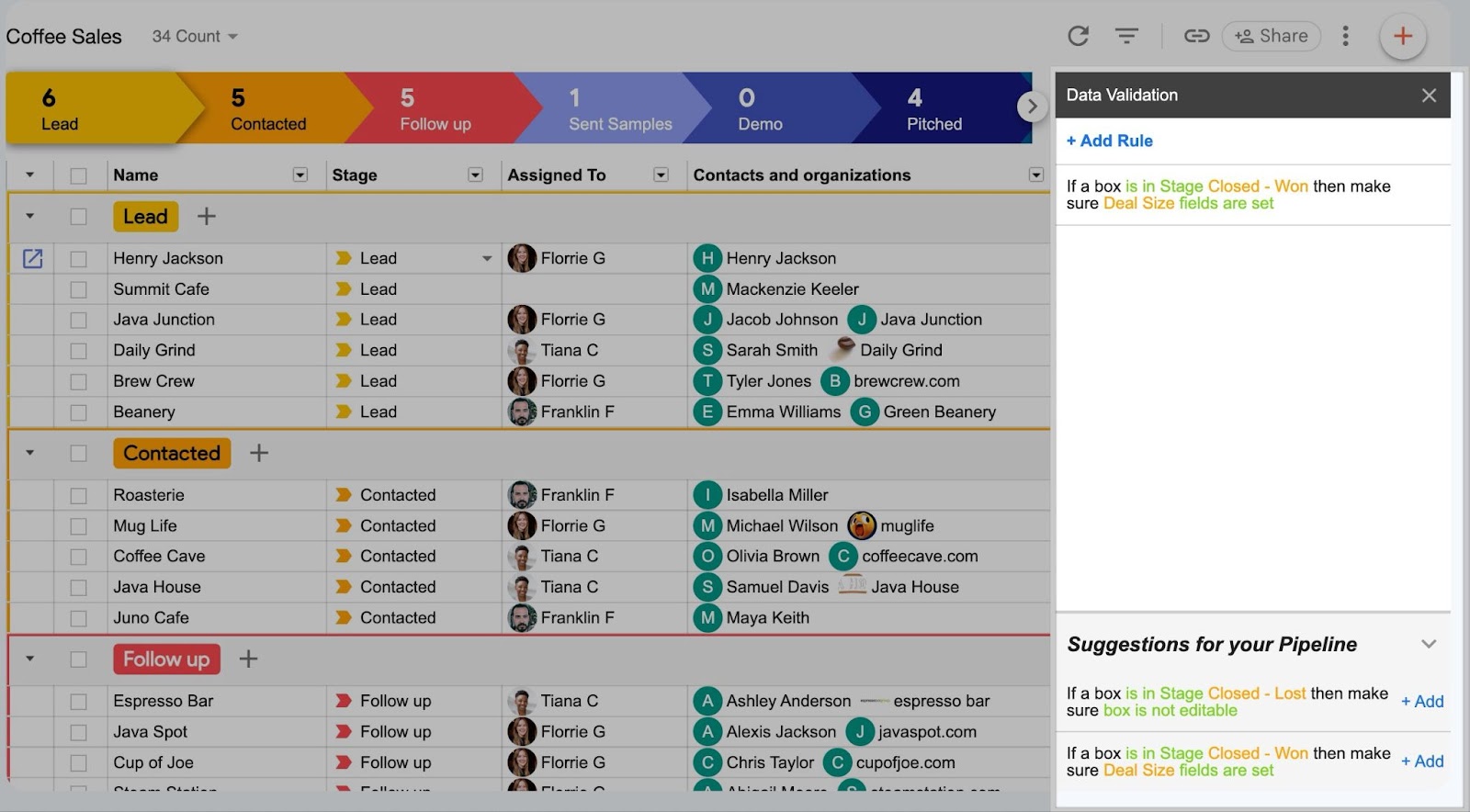
Add suggested rules with one click or create custom data validation based on what stage a lead is in, who it’s assigned to, or whether or not certain data has been entered.
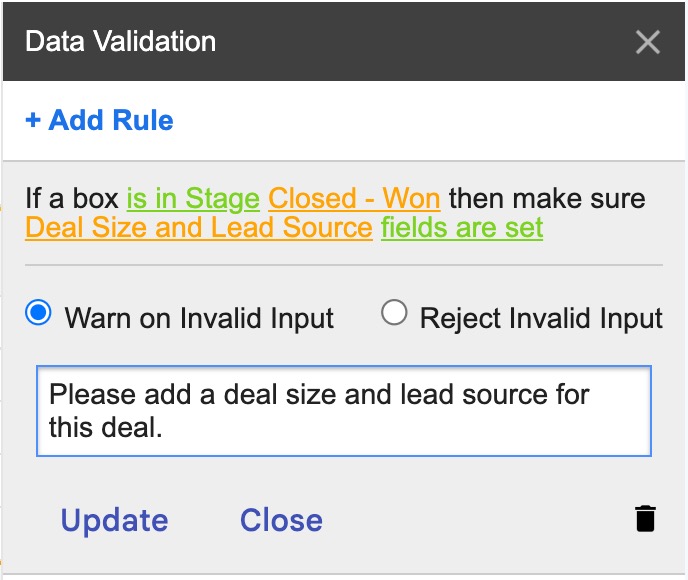
For example, enforce your process and ensure data completion by creating rules to:
Need a more complex or customized rule for your workflow? Use Javascript to create formula rules that meet your needs.

If a member of your team performs an action that breaks your data validation rule, prompt them with a warning or block the action - like moving a box into the “Closed Won” stage - until the rule has been satisfied.
As an admin on the pipeline, you’ll be given an option to override a rule if you need to. Your team members will not see this option unless given an admin role.

Data validation rules also apply in the Streak mobile apps. When someone updates a deal in the iOS or Android app in a way that breaks a rule, they’ll see the same prompt as on desktop, so your pipeline data stays complete no matter where your team works.
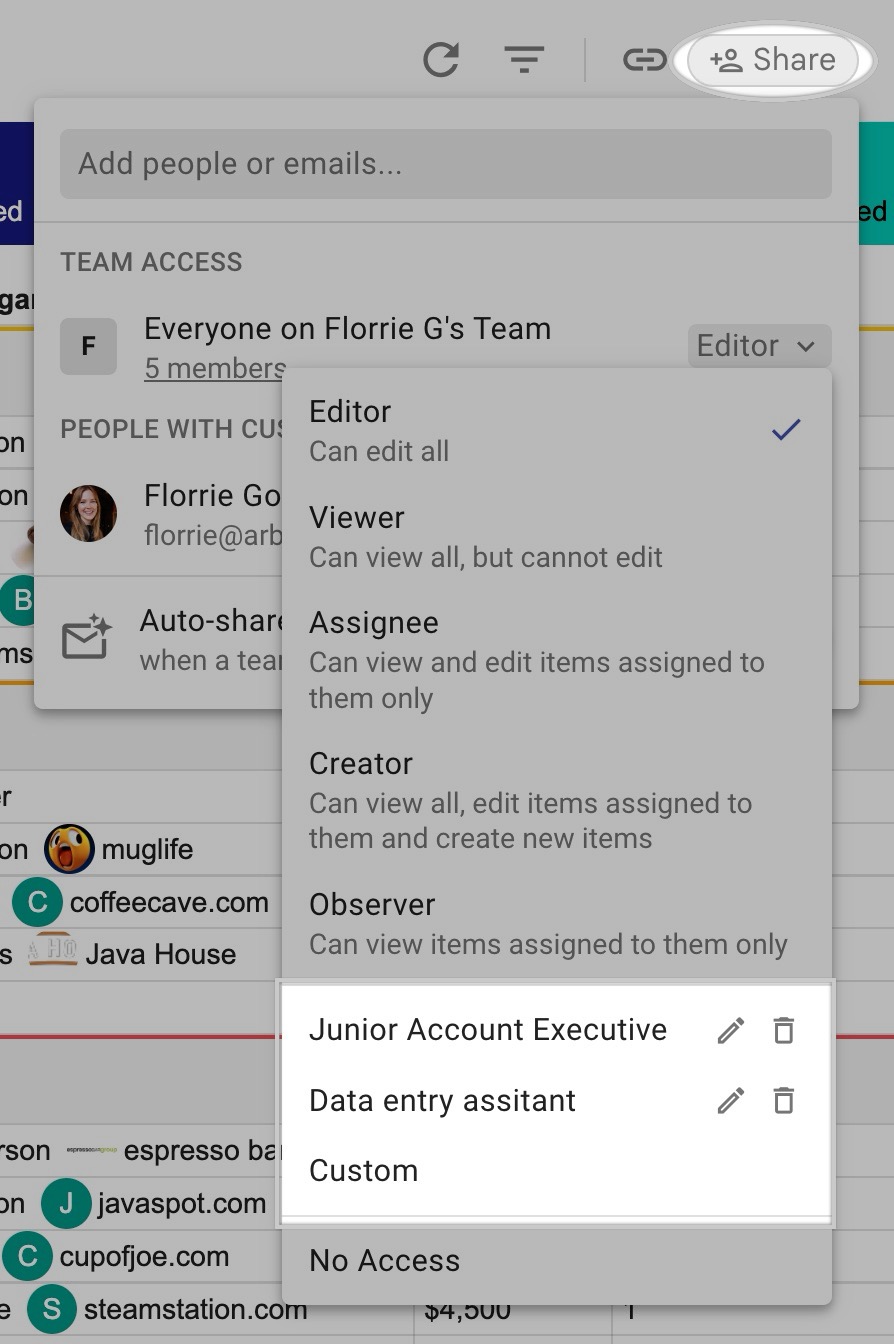
Custom roles and permission sets enable you to fully tailor permission levels for each role on your team.
As your team grows, controlling who can do what matters as much as the data itself. Custom roles let you scale from a handful of users to a large team without losing oversight: you decide who can edit pipeline structure, who can view only, and who can export or delete records. Managers keep visibility across every pipeline while each rep works only in the deals they own.
This guarantees that employees manage data according to your guidelines to prevent data loss or mishandling. It also ensures that each team member only accesses the deals and data that they need to do their jobs effectively.
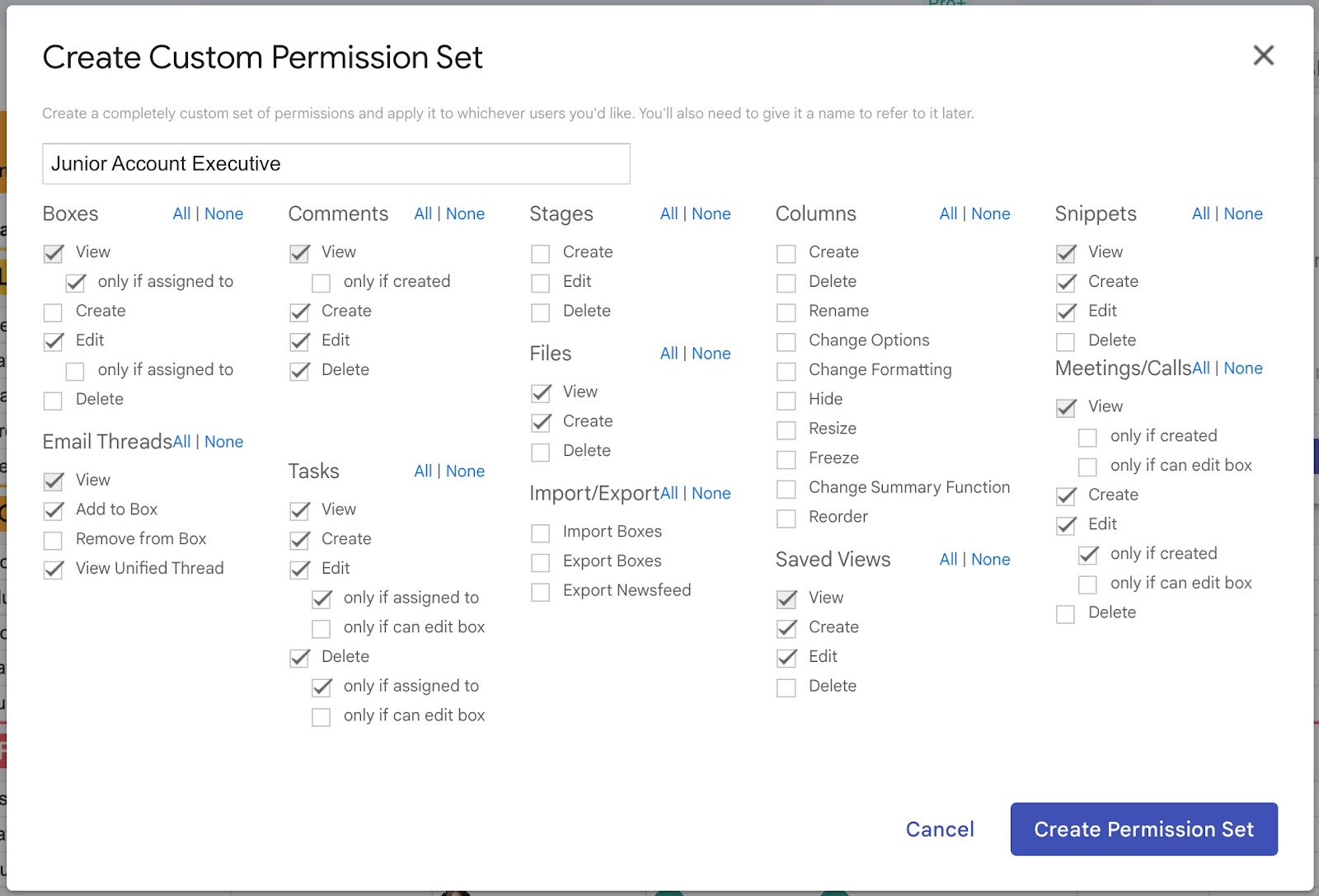
Some common ways to safeguard your data with custom permissions include:
Creating custom permissions makes it simple to set each team member up for success with exactly what they need to do their job - and help you keep track of who can access certain data and perform actions in your pipelines.
While high-quality and timely support is our standard across every plan level, Enterprise plans receive dedicated support from our team.
Our commitment to exceptional support is reflected in our performance goals and customer feedback:
This dedicated support ensures that your business keeps running even as your team has questions or support needs.
For teams with more complex setups — data migrations, multiple automations, or custom integrations — our team can do the setup work for you through hands-on custom CRM setup.
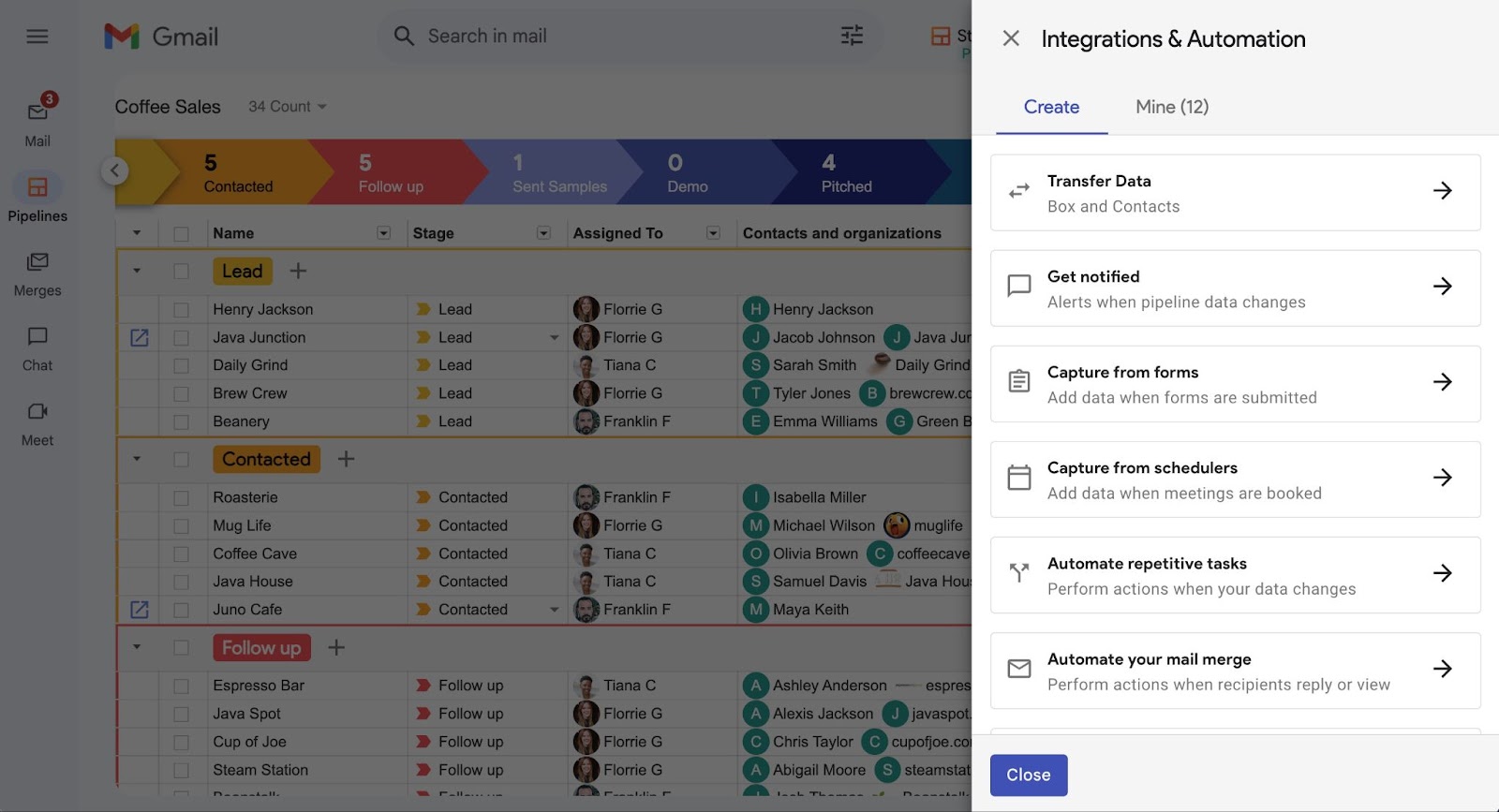
You work with an expert from our Customer Success team who learns your process, then dedicates five hours to building it: cleaning and migrating your existing data, connecting your lead sources, setting up integrations and AI-powered automation steps, and configuring one-click calling or custom API work. The result is a CRM that fits how your team works from day one.
Hands-on setup is included at no additional cost on the Enterprise plan. Pro and Pro+ teams can add it for a one-time flat fee. Learn about hands-on custom CRM setup →
Our Enterprise plan includes flexible custom billing options to accommodate the unique needs of your organization. We offer a variety of payment methods and the convenience of consolidating billing for multiple teams under custom terms.
This flexibility ensures that managing your payments is as streamlined and hassle-free as possible, allowing you to focus more on your business and less on administrative tasks.
Understanding the importance of security in certain industries and business environments, our Enterprise plan includes comprehensive support for security questionnaires. We provide written responses to custom security-related queries to give you the confidence that our CRM meets your organization's stringent security standards.
The Enterprise plan adds guardrails and control for teams: pipeline data validation, custom roles and permission sets, dedicated support, hands-on implementation, custom billing, and security questionnaire support. It builds on everything in Pro+ and stays inside Gmail.
Data validation is a set of rules that require key information before a record can move forward — for example, a deal size before a deal reaches the Closed won stage. It keeps pipelines complete and consistent, so your reports stay accurate.
Yes. Validation rules created on desktop also apply in the Streak iOS and Android apps. When a mobile update breaks a rule, the app shows the same prompt as desktop, so your data stays complete wherever your team updates deals.
Yes. Custom roles and permission sets let you decide who can edit pipeline structure, who has view-only access, and who can export or delete records. You can also hide sensitive fields like files or call logs from roles that don't need them.
Streak's Enterprise plan is built for larger teams and more complex workflows. It adds the permissions, data validation, and manager oversight that keep data reliable as headcount grows, while keeping the CRM inside Gmail where your team already works.
Hands-on custom CRM setup is included at no additional cost on the Enterprise plan. Pro and Pro+ teams can add it for a one-time flat fee. A Customer Success expert dedicates five hours to configuring your pipelines, automations, and integrations.
Stay in the loop with Streak’s latest features and insights.
Contact a sales representative to learn more about how Streak's Enterprise CRM plan can help you protect your data and manage your team.
Contact a sales representative to learn more about how Streak's Enterprise CRM plan can help you protect your data and manage your team.


